AI-powered business performance & execution
See where your business is behind — and what to fix first.
Beflow Decisions measures your KPIs against your targets and last year, shows each gap and what it’s worth, sets out the possible reasons with the evidence for and against them, and turns the fix into a mission whose results you can measure.
14 days of the Business plan, free. No credit card. Connect QuickBooks Online or upload Excel or CSV.
Built on facts, not promises
- of the Business plan, free — no credit card
- 14 days
- traced back to the transactions it comes from
- Every figure
- scored 0–100 in one Business Health Score
- 8 areas
- between encrypted backups of your data
- 15 minutes
- Encrypted in transit and at rest
- Two-step sign-in
- Payments by Stripe — we never see your card
- Every administrative action audited
The problem
Most dashboards tell you what happened. Not what to do about it.
Business owners decide every week with half the picture — and the costly problems are the ones nobody sees coming.
Decisions on incomplete information
Figures sit in the accounting system, a spreadsheet and someone’s inbox. By the time they’re in one place, the month is over.
Hidden risks erode growth and profit
A customer paying later each month, a margin slipping a point a quarter, too much revenue in too few hands — small until they aren’t.
Charts without a next step
A dashboard shows forty charts and leaves the hard part to you: deciding which problem matters most, and what to do about it.
How it works
From your books to a measured result, in four steps
Connect your business data
Link QuickBooks Online in a couple of clicks, or upload Excel or CSV — with ready-made templates for monthly figures, sales and targets. Beflow organises it into one picture of your business.
Set targets, see the gaps
Set targets by KPI and month, or start from last year. Every closed month is measured against them — or against the same month last year — and each gap shows its money at stake where the books support a figure.
Understand why, decide what to do
For each major gap, competing explanations drawn from your own figures, each with the evidence for and against it and a deliberately cautious confidence — then actions ranked by what they’re worth.
Execute and measure the result
Turn a recommendation into a mission with an owner, tasks and a deadline. Once it finishes, Beflow measures how the KPI moved over the following closed months — an observed change, shown beside the results your team reports.
Features
From where you’re behind to what you did about it.
Targets & Performance Gaps
Targets by KPI and month — typed in, from last year, or from a template. Every closed month measured against them, largest gaps first, with the money at stake where it can be worked out.
Evidence-Backed Explanations
Why a gap may have opened: what the books show, then up to four possible reasons with the evidence for and against each. Possibilities, never claimed causes — and you can say whether each one is right.
Executive Recommendations
Prioritised actions with an estimated financial impact, effort and confidence. Approve, dismiss or assign them.
Executive Missions
Turn a decision into a plan: owner, tasks, deadline and progress — then the KPI it targeted, measured after it finishes, beside the benefit your team records.
AI Executive Home & Brief
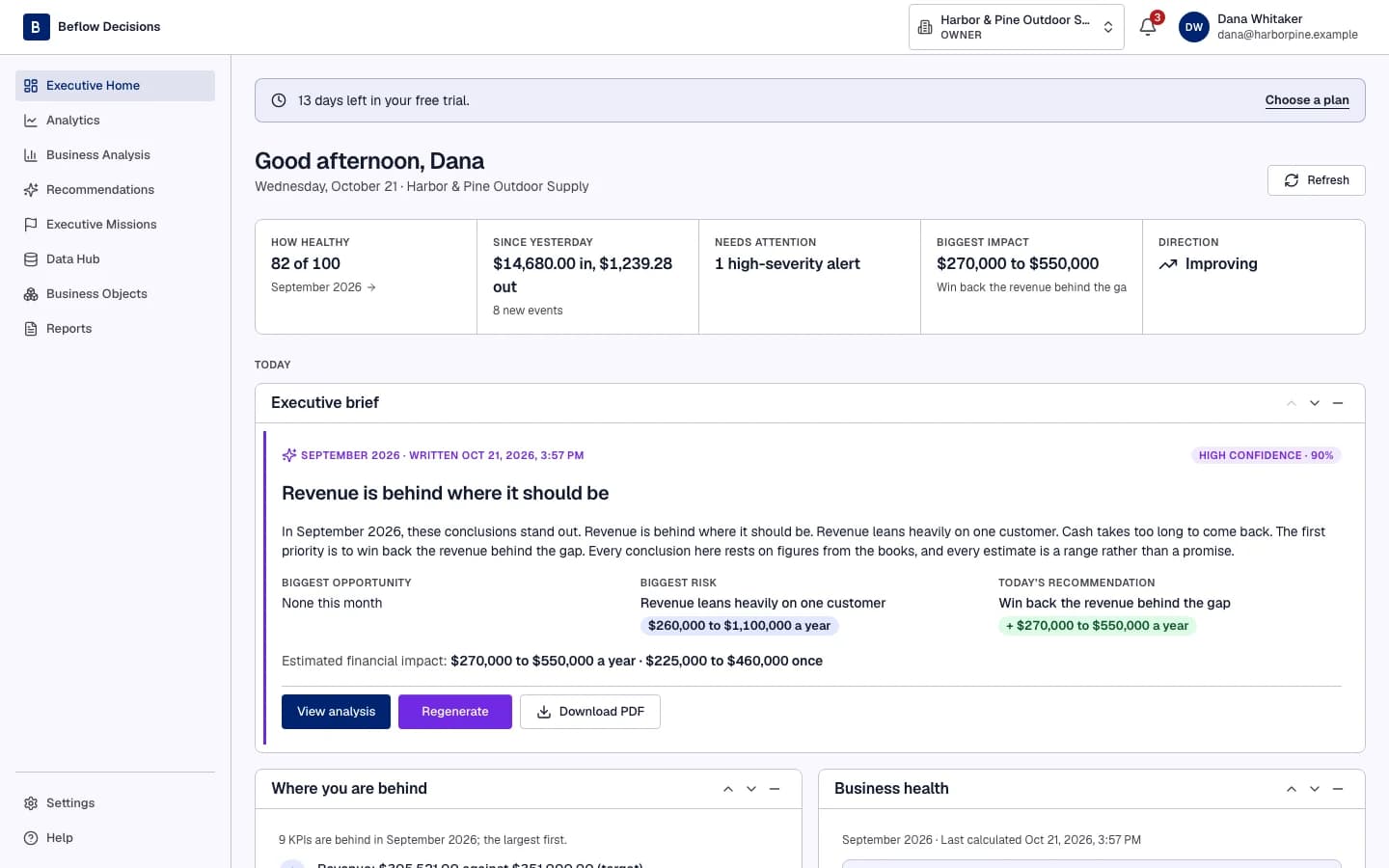
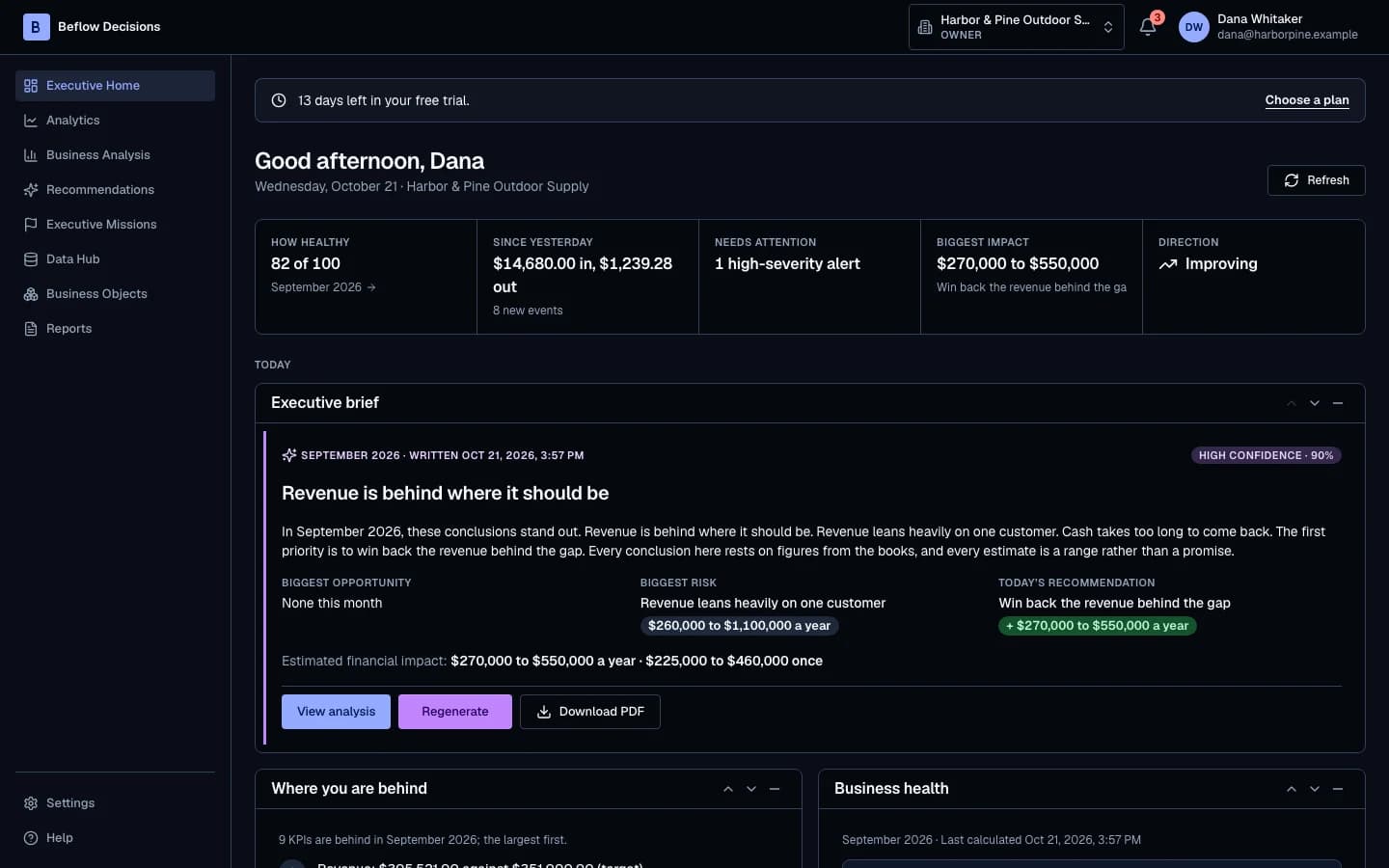
Your business on one screen each morning — where you’re behind, what changed, what needs you — with a short written brief that cites the figures it’s based on.
Business Health Score
One score from 0 to 100 across finance, cash flow, revenue, customers, operations, products, growth and risk — and why it moved.
Executive Reports
Board-ready reports in PDF, Word and PowerPoint, in your brand — generated in seconds, shared or scheduled.
QuickBooks, Excel & CSV
Connect QuickBooks Online and your books stay in sync — read-only, so Beflow never changes your accounting — or upload Excel and CSV. KPIs, trends and history calculated from your own ledger.
Product tour
See it before you start
The real product, with a fictional company’s books.
Executive Home: where you’re behind, what changed since yesterday, alerts and the recommendation worth the most.
Pricing
Simple plans that pay for themselves
Start with 14 days of the Business plan, free. Choose a plan when you’re ready.
FAQ
Questions, answered
Which data does Beflow Decisions use?
Your own books: QuickBooks Online, or the Excel and CSV files you upload, including our templates for monthly figures, sales and targets. Beflow reads them; it never writes to your accounting system. PDF reports aren’t supported yet — export them to Excel or CSV.
How long until I see results?
Connecting QuickBooks takes a couple of minutes. KPIs, the Business Health Score and recommendations follow as soon as your books are imported and calculated — typically within the hour. Performance gaps need a closed month and a target, or the same month last year, to measure against.
Can I trust the AI’s numbers?
Every figure is calculated by Beflow’s engine from your ledger, not invented by the AI. The AI explains and prioritises, and each recommendation links to the transactions behind it.
Does Beflow tell me what caused a change?
No — and it says so. Explanations are offered as possibilities, each with the evidence for and against it and a cautious confidence. When a mission finishes, Beflow shows how its KPI moved over the following months: an observed change, not proof that the mission caused it.
Is my financial data safe?
Data is encrypted in transit and at rest, backed up every 15 minutes, and visible only to the people you invite, as their roles allow. Customer and product names are replaced before anything is sent to the AI, and your data is not used to train AI models.
How is this different from a BI dashboard?
A dashboard shows what happened. Beflow Decisions shows where you’re behind your targets, what it’s worth, what may be driving it and what to do about it — then helps you do it and measures how the KPI moved afterwards.
Can my team, accountant or advisors use it?
Yes. Invite people with one of six roles, from Owner to read-only Viewer. Every administrative action is recorded in the audit log.
What happens when the trial ends?
Choose a plan to keep going. If you don’t, your account becomes read-only — everything stays visible and downloadable until you subscribe.
Can I cancel at any time?
Yes. Cancel from Billing and your plan runs to the end of the period you’ve paid for.
Start Making Better Business Decisions Today
Connect your books, set your targets and see where your business is behind — 14 days free.
- No credit card
- 14 days of Business
- Cancel anytime